

Documentation
Introduction
What Keldon is, the concepts you need to know, and how the pieces fit together inside Kubernetes.
Welcome to Keldon
What Keldon is
Keldon is a Kubernetes operator that extends the Kubernetes API with custom resources that describe a database cluster, and that watches those resources to make the cluster reality match the declared spec.
In practice, this means you write a small YAML file describing the cluster you want — coordinator, standby, segments, mirrors, storage, and configuration — and Keldon does the rest. The operator handles initialization , SSH key and certificate distribution, service creation, pod orchestration, failover, and recovery. Operations that traditionally require detailed runbooks become single declarative actions.
Kubernetes naturally fits the MPP architecture: each coordinator, standby, segment, and mirror can run as its own stable pod with its own storage. Keldon builds on that model by automating the hard parts — bootstrapping the cluster, wiring services, attaching storage, configuring replication, handling failover, and keeping the database aligned with the declared spec.
Who it’s for
Keldon is built for two main audiences:
Teams running analytical workloads. Data engineering, BI, and AI/ML teams that need MPP query performance — large parallel scans, columnar analytics, complex joins across billions of rows — without operating a database from raw Kubernetes primitives.
Organizations migrating from proprietary Greenplum. Apache Cloudberry is the open-source fork of Greenplum that emerged in 2024 after Broadcom’s acquisition of VMware. Teams running Tanzu Greenplum, particularly those reviewing licensing renewals, can migrate to Cloudberry-on-Keldon with the same SQL, same wire protocol, same tooling, and the same workload model — but on Kubernetes, automated, declarative, with self-healing capabilities, and open source.
Key Concepts
MPP databases in one paragraph
A massively parallel processing (MPP) database is built for large-scale analytical warehouse workloads. It distributes data across multiple nodes and runs queries in parallel across them. Instead of one large machine doing all the work, multiple machines each process a slice of the data simultaneously. This makes MPP databases much faster than single-node databases for large analytical queries, including scans of billions of rows, joins across multiple large tables, and complex aggregations. Greenplum, Cloudberry, Snowflake, Redshift, and BigQuery all use this distributed processing model.
The cluster topology
Apache Cloudberry cluster has four kinds of nodes:
| Role | Purpose | Count |
|---|---|---|
| Coordinator | Receives client queries, plans them, dispatches to segments, aggregates results. Holds the catalog. | Exactly 1 |
| Standby | Hot replica of the coordinator. Promoted to active coordinator if the primary fails. | 0 or 1 |
| Segments | Data nodes. Each segment stores and processes a slice of the data. | 1 to N |
| Mirrors | Hot replicas of segments. One mirror per primary segment, on a different machine. | 0 to N |
Clients connect only to the coordinator (or the standby after a failover). They never connect directly to segments. The coordinator is the single point of entry for all SQL traffic.
The role of an operator
Running an MPP cluster from raw Kubernetes primitives is possible but tedious. You’d need to:
- Manage StatefulSets for each role (coordinator, standby, segments, mirrors)
- Wire up Services so the coordinator can find segments and vice versa
- Distribute SSH keys across all pods so
gpinitsystemand inter-segment communication work - Provision the
gpinitsystemconfig file describing every host - Run
gpinitsystem,gpinitstandby, mirror configuration scripts at the right time - Set up replication between primaries and mirrors
- Detect pod failures, drain segments, recover them, rebalance data
- Track which segment is primary vs which is mirror, and re-elect if needed
- Roll out config changes without downtime
The operator handle all of this. You declare what you want; the operator figures out how to get there and keep it there. Specifically — whether that’s a new YAML applied, a pod that crashed, a node that disappeared, or a configuration update. Ò
The CRD vocabulary at a glance
Keldon defines six custom resources under the keldon.io/v1alpha1 API group. You’ll see these throughout the docs:
| Kind | Short Name | Scope | Purpose |
|---|---|---|---|
DatabaseImage |
dbi |
Cluster | Reference to a container image + database version |
DatabaseClusterClass |
dcc |
Cluster | Reusable cluster topology and resource defaults |
DatabaseConfig |
dbx |
Namespace | Declarative postgresql.conf and pg_hba.conf |
DatabaseCluster |
dbc |
Namespace | The cluster itself (coordinator, standby, segments, mirrors) |
DatabaseBackup |
dbb |
Namespace | On-demand backup to S3-compatible storage |
DatabaseRestore |
dbr |
Namespace | Restore from a backup into a cluster |
The minimum required resources for your first MPP database cluster are a
DatabaseImageand aDatabaseCluster. TheDatabaseImagedefines which database image to run, and theDatabaseClusterreferences it to create the actual cluster.
DatabaseClusterClassandDatabaseConfigare optional helpers for reusable topology and custom database configuration.
For full specs of each CRD, see the Custom Resources Reference.
Architecture
This section explains how Keldon arranges resources inside a Kubernetes cluster. Understanding this helps you reason about pod placement, debugging, and scaling.
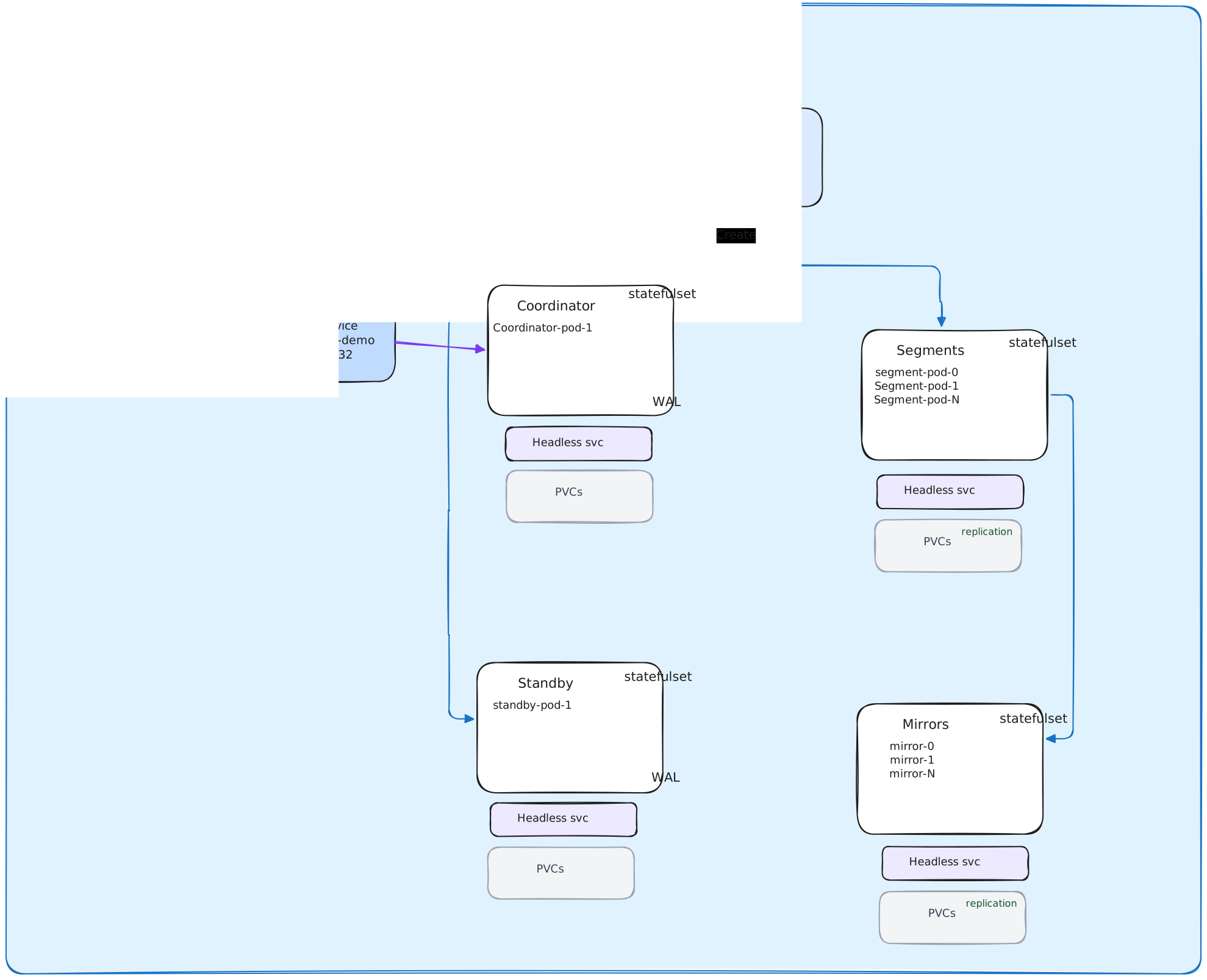
Pod and StatefulSet layout
Every role in maps to its own StatefulSet. For a cluster named cluster-demo with 2 segments, mirroring enabled, and a standby:
StatefulSet: cluster-demo-coordinator   →  Pod: cluster-demo-coordinator-0
StatefulSet: cluster-demo-standby       →  Pod: cluster-demo-standby-0
StatefulSet: cluster-demo-segment       →  Pods: cluster-demo-segment-0
                                              cluster-demo-segment-1
StatefulSet: cluster-demo-mirror        →  Pods: cluster-demo-mirror-0
                                              cluster-demo-mirror-1
StatefulSets are used (rather than Deployments) because each pod has a stable identity, ordered replicas, and persistent storage tied to the pod ordinal. The pod-to-storage binding is critical for MPP databases — segment 0 always reads its own data from
segment-0’s PVC, not whichever segment pod starts first.
During bootstrap, Keldon brings all database pods up together so they can discover each other, establish SSH trust, and initialize the MPP cluster.
Pod DNS and naming
Each StatefulSet has a corresponding headless Service that gives every pod a stable DNS name:
cluster-demo-coordinator-0.cluster-demo-coordinator.default.svc.cluster.local
cluster-demo-segment-0.cluster-demo-segment.default.svc.cluster.local
cluster-demo-mirror-0.cluster-demo-mirror.default.svc.cluster.local
The format is <pod-name>.<headless-service>.<namespace>.svc.cluster.local. These DNS names are what Cloudberry’s internal segment configuration uses — they’re stored in gp_segment_configuration and referenced by every distributed query.
Services
For each role, Keldon creates five Services:
- Headless Service (
clusterIP: None) — used for stable per-pod DNS names. - Client Service (
ClusterIP) — used by application clients. For the coordinator, this is the connection endpoint clients use to reach the database.
cluster-demo-coordinator         (headless, for DNS)
cluster-demo                     (ClusterIP, for clients on port 5432)
cluster-demo-segment             (headless, for DNS)
cluster-demo-mirror              (headless, for DNS)
cluster-demo-standby             (headless, for DNS)
Application traffic always goes through the ClusterIP Service on the coordinator. if a coordinator failover happens, the operator updates the Service’s selector to point at the standby instead, and clients reconnect transparently.
External traffic (from outside the cluster) reaches the database only through the coordinator ClusterIP Service. Production deployments typically wrap this with a LoadBalancer Service, an Ingress with TCP support, or a port-forward for development. See Connecting to a Cluster for patterns.
Storage
Each pod gets its own PersistentVolumeClaim, sized according to the spec:
spec:
  coordinator:
    storage: 10Gi
    storageClassName: local-path
  segments:
    storage: 10Gi
    storageClassName: local-path
Storage is per-pod, not shared. Segment 0’s data lives on its own PVC; segment 1’s data lives on its own PVC; mirrors have their own PVCs. There is no shared filesystem.
For development clusters, a simple dynamic StorageClass such as local-path is usually enough. For production, use a reliable SSD-backed StorageClass from your Kubernetes platform — for example cloud block storage, Rook/Ceph, Longhorn, or dedicated local NVMe with proper node placement. Segment and mirror pods are I/O-heavy, so choose storage for latency, throughput, and recovery behavior, not only for capacity.
What the operator runs
Keldon itself runs as a single Deployment in the keldon-system namespace (by default), with one replica. The operator pod contains:
- The controller-runtime manager
- Reconcilers for each of the six CRDs
- An admission webhook server (listens on port 9443)
- A metrics endpoint (port 8080)
The operator watches all namespaces by default. Custom resources can live in any namespace; the operator reconciles them from a central location.
Now that you understand what Keldon is and how it fits together, head to Getting Started to install the operator and create your first cluster.